
How to set up an AI voice agent for your business phone number
Why voice belongs in the same inbox as chat
Customers start on WhatsApp and then call, or call and then follow up by email. When calls live on a separate phone system, the agent on the call cannot see the chat that came before it, and the customer explains everything twice. In Samvaads a call opens an Inbox thread with its recording and transcript, beside the customer’s messages.
What you need
- A Samvaads plan that includes voice calling and AI agents
- An account and number with Exotel, TeleCMI/PIOPIY or Plivo (India), or Twilio (international)
- A few knowledge base articles covering what callers usually ask
Steps
Open Voice / calling
Go to Admin → Channels → Voice / calling. The page lists your numbers, their provider and status, and shows how many numbers your plan allows. IVR & queues is in the header.

Voice / calling, before any number is added. Add the number
Choose New number. Give it a name, enter the phone number in E.164 format (+91…), pick the Provider and Region, and the Number kind: local DID, toll-free, promotional 140-series or service 160-series. Paste the credentials from your provider’s dashboard; saved secrets stay masked. In India, recording is announced to callers.
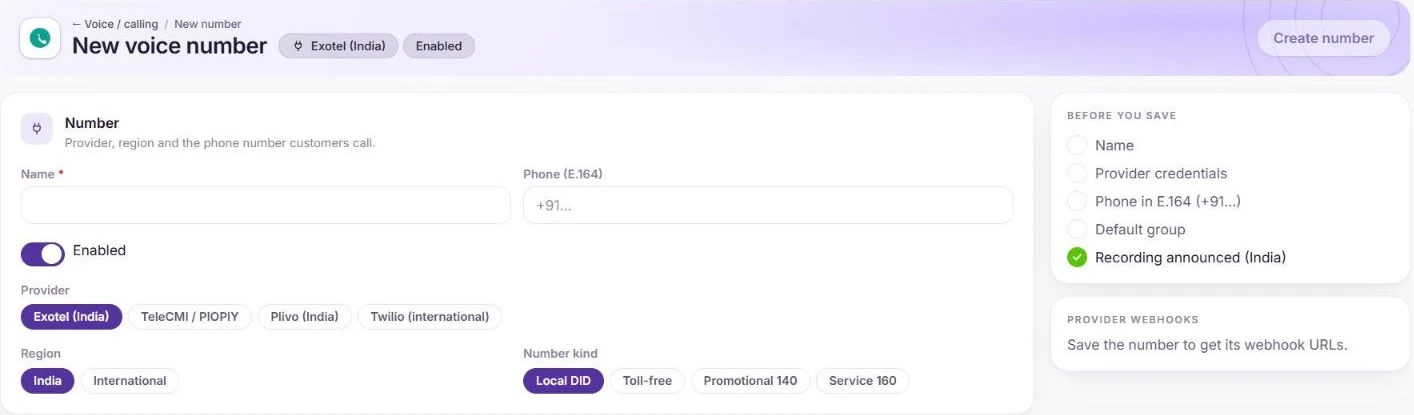
Provider, region and number kind on a new voice number. Paste the webhook URLs into your provider
Save the number to get its webhook URLs, then paste the inbound URL into your provider’s answer webhook. Inbound calls now open Inbox threads with the recording and transcript.
Set up IVR and queues
Use IVR & queues to build the menu callers hear and the queues calls go to, such as Sales and Support. Route an option, or every call, to the AI agent.
Switch the agent to voice
In Admin → Automation & AI → AI agents, open the agent and, in Agent settings, tick Voice calls (WhatsApp calls / phone AI). Choose its voice and call languages, test it in Preview, and publish.
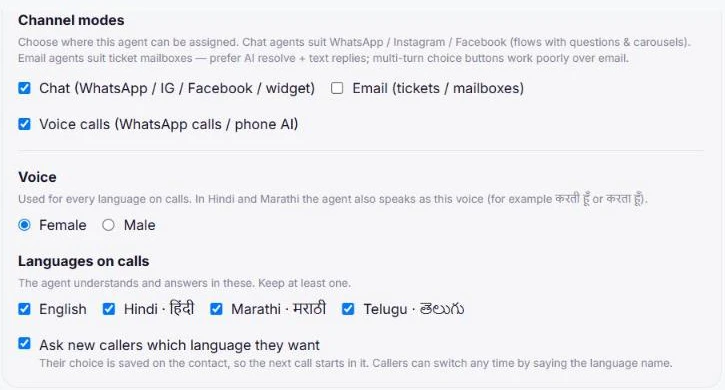
The same agent settings serve phone and WhatsApp calls. Watch the first calls
Read the first day’s calls and handoffs in the Inbox, add knowledge base articles for the gaps, and publish a new version of the agent.
Frequently asked questions
Can the same agent answer WhatsApp calls?
Yes. An agent with Voice calls switched on can answer calls to your WhatsApp number too, with no telephony provider needed. See how to deploy a voice AI agent on WhatsApp.
Do we need to buy phone numbers from SachDesk?
No. Bring your existing provider. Exotel, TeleCMI/PIOPIY and Plivo cover India numbers; Twilio covers international numbers.
How do agents make outbound calls?
From the calling widget in Samvaads, on your connected number. Texting lives under SMS.
Want us to set it up with you?
Early customers onboard with our team beside them.