
How to automate your helpdesk with workflows
Routing decides who gets the work; workflows decide what happens to it. Use them for the small rules your team applies by hand every day: reopen, re-prioritise, tag, notify.
What you need
- Admin access to your Samvaads workspace
Steps
Start from an example
Go to Admin → Automation & AI → Workflows. Ready-made examples are there, switched off: reopen resolved tickets when the customer replies, prioritise VIP conversations, raise escalated tickets to high priority, tag refund requests, and flag urgent tickets. Open one to see its trigger and steps.
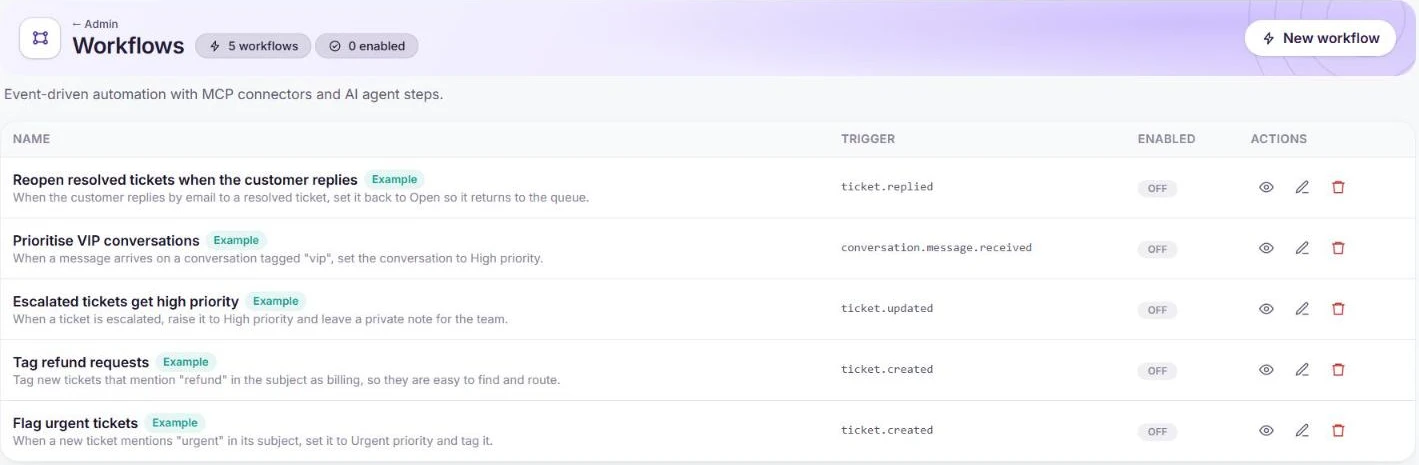
Example workflows and the events that trigger them. Pick the trigger
Every workflow runs on an event, for example ticket.created, ticket.updated, ticket.replied or conversation.message.received. Choose New workflow to build your own.
Add steps and switch it on
Add the actions to take, such as setting priority, status or tags, or leaving a private note. Workflows can also call MCP connectors and AI agent steps. Switch the workflow on when it does what you expect.
Frequently asked questions
What is the difference between workflows and routing?
Routing (Admin → Automation & AI → Routing & macros) assigns new tickets and chats to people. Workflows react to events and change the record.
Want us to set it up with you?
Early customers onboard with our team beside them.