
How to connect Claude, Cursor or any MCP client to Samvaads
Samvaad MCP is a hosted gateway that lets AI agents and automation tools work with your workspace data. It never gets more access than the API key you give it, and any MCP-compatible app can connect over the internet, not only tools on your own machine.
What you need
- Admin access to create API keys
- An MCP-compatible client, such as Claude or Cursor
Steps
Open the Samvaad MCP page
Go to Admin → Automation & AI → Samvaad MCP. It shows the transport (Streamable HTTP, stateless), the published tools, and a ready-made client configuration.
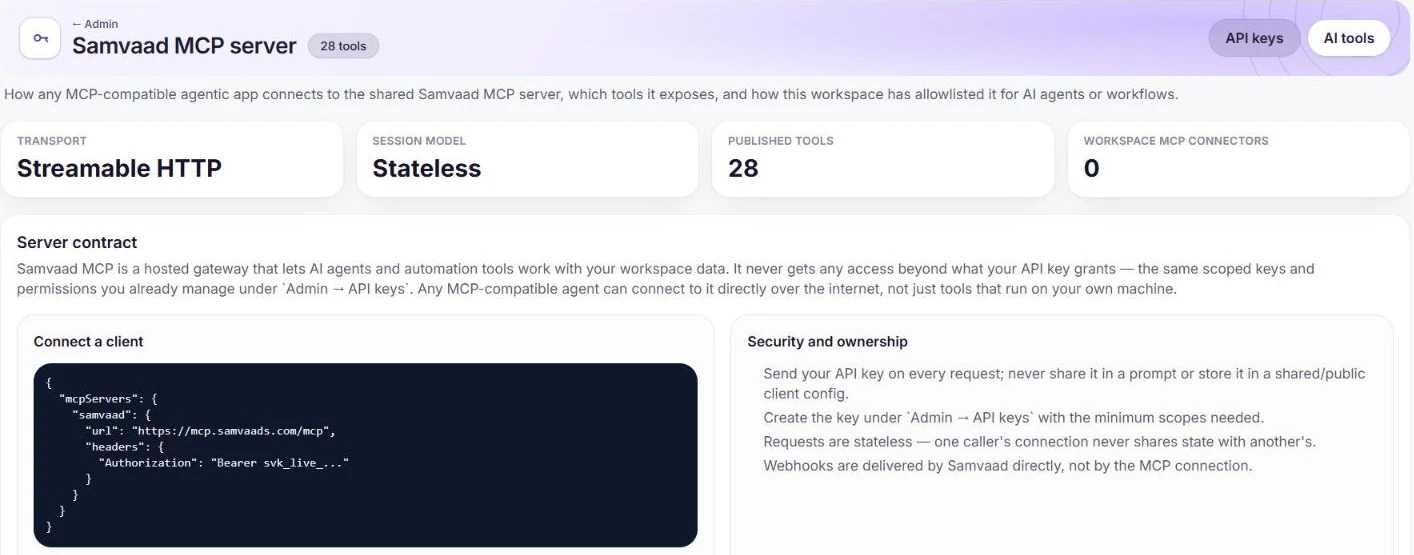
The client configuration and how access is controlled. Create a scoped API key
Under Admin → API keys, create a key with the minimum scopes the client needs. Never paste it into a prompt or a shared configuration file.
Add the server to your client
In your MCP client, add a server named `samvaad` with the URL `https://mcp.samvaads.com/mcp` and the header `Authorization: Bearer <your key>`. Requests are stateless, so one caller’s connection never shares state with another’s.
Frequently asked questions
Can our own AI agents and workflows use MCP tools too?
Yes. Workspace MCP connectors let AI agents and workflows call MCP tools; allowlist them from the AI tools section.
Are webhooks sent over MCP?
No. Webhooks are delivered by Samvaads directly, not through the MCP connection.
Want us to set it up with you?
Early customers onboard with our team beside them.