
How to choose what Copilot can do for your team
Copilot can do more than draft text: it can reply, update records and prepare follow-ups when someone asks, by typing or speaking, or from their daily briefing. Copilot actions is where you decide which of those it may do.
What you need
- Admin access to your Samvaads workspace
Steps
Open Copilot actions
Go to Admin → Automation & AI → Copilot actions. Actions are grouped by what they affect; the ones under Sent to customers produce something the customer sees, so review them carefully.
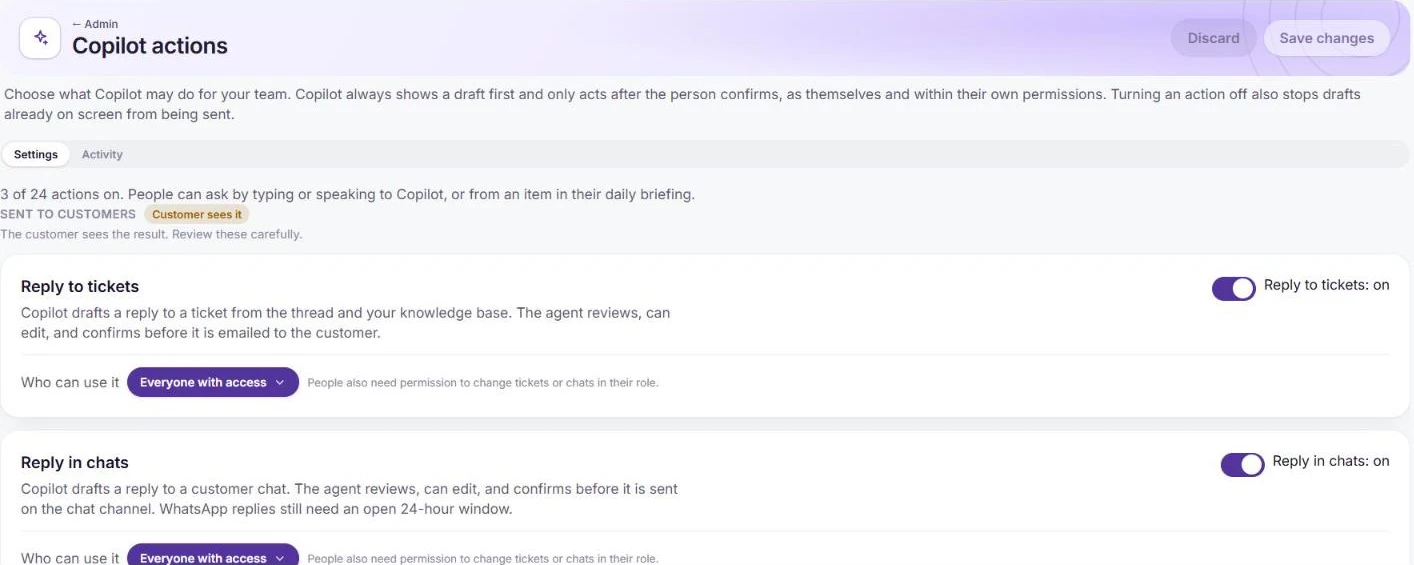
Each action has an on switch and a who-can-use-it setting. Switch actions on and choose who can use them
Turn an action on, then set Who can use it. People also need the matching permission in their role; turning an action off also stops drafts already on screen from being sent. Save changes.
Review what Copilot did
Use the Activity tab to see how your team is using Copilot actions.
Frequently asked questions
Can Copilot send a reply on its own?
No. It drafts, and the person reviews, can edit, and confirms before anything is sent. WhatsApp replies still need an open 24-hour window.
Want us to set it up with you?
Early customers onboard with our team beside them.