
How to let an AI agent call your leads
Leads go cold within hours. The AI agent can call every warm lead straight away, ask the questions a rep would, and leave the rep a clear result: qualified, wants a meeting, not interested or call back.
What you need
- A calling number connected under Admin → Voice / calling
- A published AI agent with Voice calls turned on (how to set one up)
- Leads who contacted you or opted in
Steps
Turn on outbound AI calls
Go to Admin → Voice → Outbound AI calls, turn it on and check the calling hours and limits. Under Who calls, pick the AI agent for Lead follow-up.
Write the questions
In the Lead calls card, write up to five questions, each with a key such as budget or timeline. If a key matches one of your lead fields, the answer fills that field. Say what counts as qualified, and where to move the lead when they want a meeting.
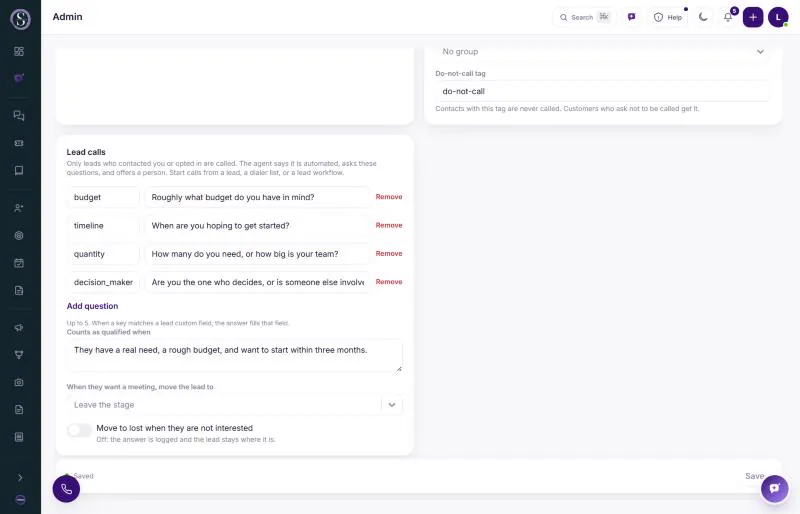
Questions the agent asks, and what qualified means. Call one lead, or a whole list
On a lead, choose AI call. For a list, go to Leads → Dialer → Calls, choose The AI agent calls them, pick the list and choose Let the AI call them. Only leads who contacted you or opted in are called, within your calling hours.
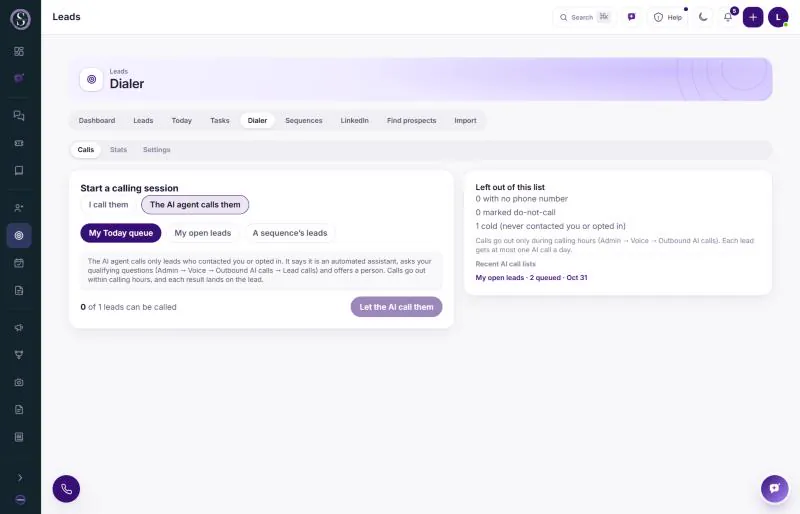
Let the AI agent work through a list. Read the results
Each call lands on the lead’s timeline with the result, the answers and a short note, and the owner gets a task when a person is needed. The dialer’s Calls tab lists each lead’s status and result for the whole list.
Frequently asked questions
Can the agent call automatically when a lead comes in?
Yes. Add the AI call step to a lead workflow, for example when a lead fills in a form.
Does the lead know it is an AI?
Yes. The agent introduces itself as your assistant, and the lead can ask for a person at any time.
Want us to set it up with you?
Early customers onboard with our team beside them.