
How to confirm cash-on-delivery orders on WhatsApp
Cash-on-delivery parcels that are refused cost you shipping both ways. Asking the customer to confirm before you ship catches wrong addresses and changed minds while it is still cheap.
What you need
- A WooCommerce store connected under Admin → Store connections
- A WhatsApp number connected to Samvaads (how to connect it)
Steps
Create the WhatsApp template
In WhatsApp Manager, create a Utility template with quick-reply buttons Confirm, Cancel and, if you like, Change address. Use variables for the customer name, order number and total, for example: “Hi {{1}}, please confirm your order {{2}} of {{3}}, to be paid on delivery.”
Turn on COD confirmation
When Meta approves the template, open Admin → Store connections → COD confirmation, turn on Send COD confirmations and pick it. Set the wait time and reminder, and whether the AI voice agent should call customers who don’t tap.
Choose what Cancel does
Cancel can cancel the order in WooCommerce straight away, or leave it and open a ticket for your team. Pick the group for these tickets, and optionally enter what one returned parcel costs you to see the saving.
Follow the answers
Customers → Store orders → Cash on delivery shows the last 30 days: COD orders, confirm rate, cancelled before shipping, no response and the estimated saving. Open an order to see its COD card.
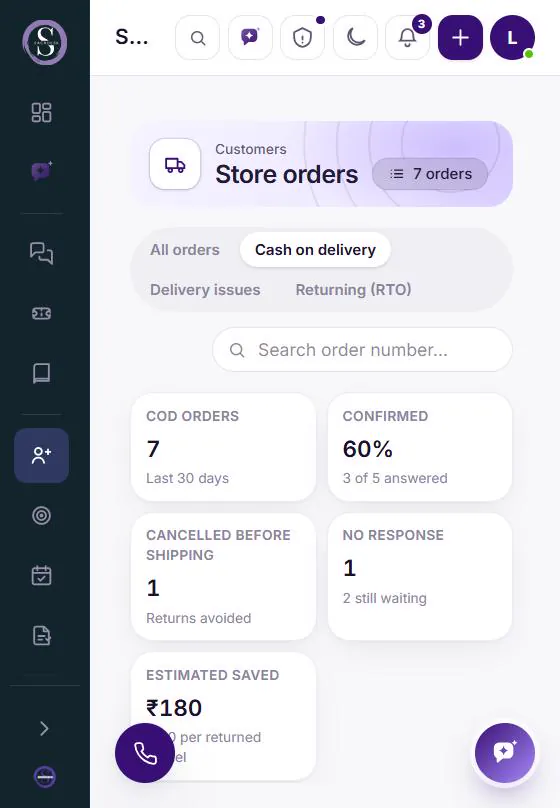
Confirm rate and the estimated saving. Settle orders by hand when needed
When a customer asks to change the address, they send it in the chat and your team gets a ticket. Update the address in your store, then choose Mark confirmed on the order.
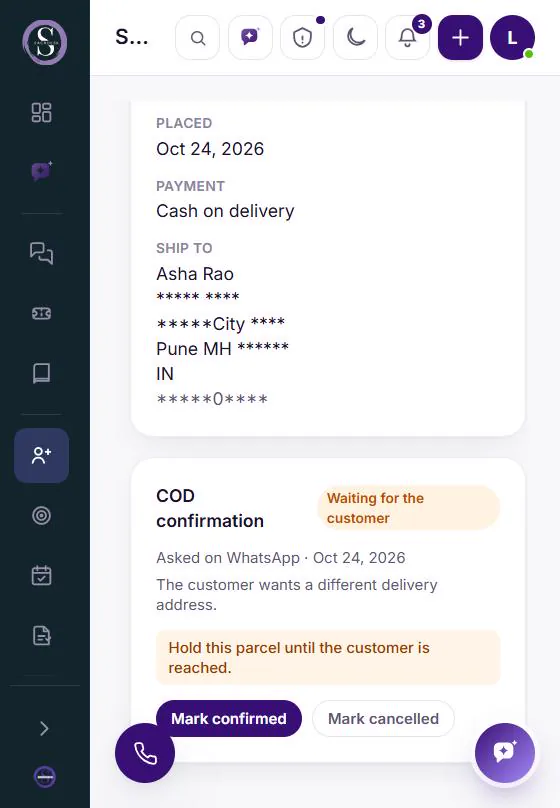
The COD card on an order.
Frequently asked questions
Does tapping a button wake my AI agent?
No. The reply to Confirm, Cancel or Change address is automatic and doesn’t assign the chat.
What if the customer never answers?
They get one reminder after the wait time, then an AI call if you turned it on. Orders still without an answer count as No response on the Cash on delivery tab, so your team can decide.
Want us to set it up with you?
Early customers onboard with our team beside them.