
How to route chats by skill and reply faster
A Hindi-speaking customer with a returns question should reach the agent who speaks Hindi and handles returns, first time. And when nobody is free, they should hear that, not wait in silence.
What you need
- Admin access to your workspace
- Tags on your tickets and chats, from your team or automation rules
Steps
Give agents their skills
In Admin → Team status, choose the pencil next to an agent’s skills and add labels such as Hindi, Returns or Billing. Agents can also set their own under Profile → Skills, unless you turn that off.

Skills next to each agent. Turn on skill-based routing
In Admin → Routing & macros → Routing, choose Skill-based round robin. A ticket or chat’s tags are the skills it needs: it goes, in turn, to available agents with one of them. Choose whether work nobody has the skill for goes to any available agent or waits in the queue.
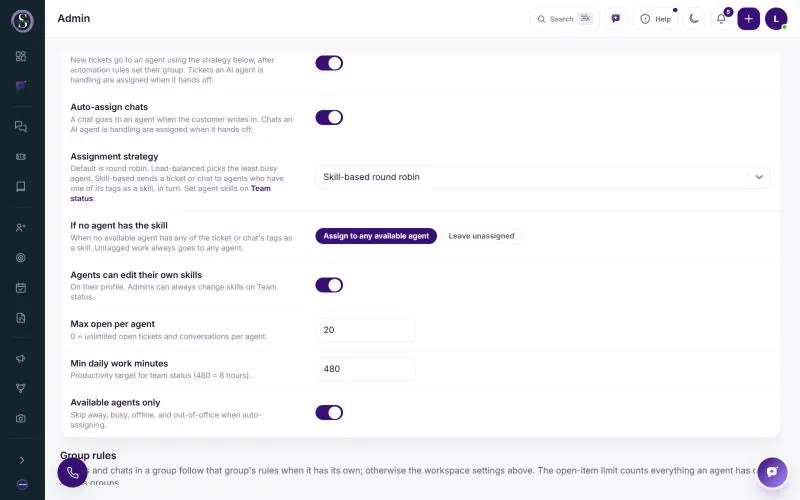
Skill-based round robin and the fallback. Tell customers when the team is away
In Admin → Routing & macros → Hand-offs, set the message customers get when an AI agent hands their chat over and nobody can pick it up, a short reply to their later messages, and a closing message. Your team is alerted by bell, email or WhatsApp until someone replies.
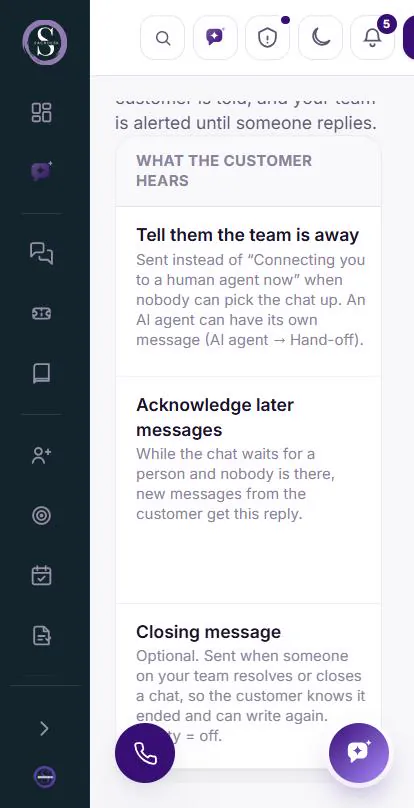
What the customer hears while they wait. Never lose a half-written reply
What you type in a chat or ticket reply is saved as your draft a moment after you stop typing. Open it later, or on another device, and it is back. Chats and tickets with a draft show a Draft label in the list.
Add a booking link in one click
In a reply, choose Insert booking link, pick the appointment type and choose Insert link. The customer picks an open time with that type’s hosts.
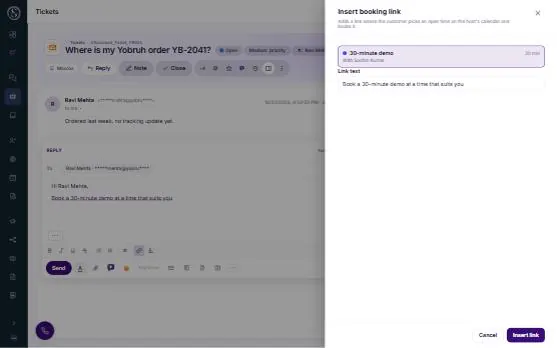
A booking link in the reply.
Frequently asked questions
Do capital letters matter in skills?
No. A skill matches a tag whatever the case, and suggestions come from the tags your team already uses.
Can teammates see my drafts?
No. Drafts are yours only, and sending the reply deletes it.
Want us to set it up with you?
Early customers onboard with our team beside them.